The Eye Tuner
Shown for FBX for Unity. The Eyes group has two parts. Texture opens the Eye Tuner, where you shape the eye texture the export bakes. Material holds the settings for the eye's material in Unity.
Opening the Tuner
Tune Eyes Texture... opens it. The button stays locked until the MetaHuman group names a character for the chosen Source, since the tuner works on that character's own eyes. A message asks first, because opening the tuner prepares the character's eye maps, which takes a little while the first time, even for a character that is already assembled. With Source on CHARACTER, it also runs the same assembly check as an export.
The tuner opens on the character you are exporting, with the look the export would use.
Tuning the Eye
The eye starts out the way Unreal draws this MetaHuman's eye. The size of the iris and the pupil, how the iris meets the white, and the veins in the white all come from the character's own eye material, so an export matches Unreal before you touch anything. The tuner is for taking it somewhere else.
The left side holds the settings, in groups that follow the eye from the middle outward.
- Character names the MetaHuman whose eyes the tuner works on.
- Iris Placement sets how much of the eye the iris covers, where it sits on the eye texture, how open the pupil is, and what reflects over the pupil.
- Iris Colour sets how the iris itself reads, and a shade toward its rim that gives the eye depth.
- Iris Edge shapes how the iris fades into the white.
- Limbal Ring darkens the ring around the iris beyond the one the MetaHuman already has, for a bolder eye.
- Sclera sets the white itself: the size of its own veins, its colour, and a shadow toward the edges that seats the eyeball in its socket.
- Veins & Redness lays faint veins and redness over the white away from the iris.
The Pupil
Pupil Dilation sets how open the pupil is within the iris, from a small pupil as in bright light to a wide one as in the dark. It starts from the MetaHuman's own setting, a touch wider, since the same setting draws a slightly smaller pupil on a Unity eye than in Unreal.
Pupil Reflection decides what reflects over the pupil. A pupil is an opening, so no colour comes back from it, but the clear cornea in front of it still reflects, which is why a real eye shows its catchlights right over the pupil.
- CORNEA ONLY keeps the pupil black and lets the cornea reflect over it, the way a real eye does.
- FULLY DARK clears every reflection over the pupil, for a flat black.
- CORNEA AND EYE lets the eye's own sheen cover the pupil as well as the iris, when Iris Sheen gives it one.
Iris Colour
Unreal draws the iris from the same baked texture the export uses, but its eye shading renders it more vivid than the texture itself, with a more saturated colour and a much stronger fibre pattern. Unity's eye material lights the texture as it is, so the same iris can read flat. Four settings give that life back, and they start at the look Unreal gives the iris.
- Brightness sets how light the iris reads.
- Contrast sets how strongly the light and dark parts of its pattern stand apart.
- Saturation sets how vivid its colour is.
- Clarity sharpens the fine pattern, so the eye still reads from a distance without getting any brighter.
That look is a brighter iris with a little clarity, its colour and contrast as baked. Unreal's shading makes an iris more vivid rather than lighter, but Unity's eye answers the light less, so the iris is baked brighter to read the same. At 1, 1, 1 and 0 the iris is exactly as baked. Infer from MetaHuman sets them back to that look. Tune from there.
Rim Depth darkens the iris toward its rim, so the eye reads as a hollow rather than a flat disc.
Iris Edge
Where the iris meets the white, a real eye fades softly over a short distance, with no line. Four settings shape that fade.
- Fade Length sets how far the iris fades into the white.
- Fade Easing sets how smoothly the fade starts and ends, without making it any longer. Lower gives an even fade that stops at a visible line.
- Outer Haze and Haze Strength add a fainter haze of the iris around the main fade, which is what keeps a short fade from reading as a hard edge.
The White of the Eye
Veins & Redness lays faint veins and redness over the white away from the iris, as a MetaHuman's eye shows in Unreal, so the white beside the iris reads clean and bright. Start, Softness, Strength and Tint set where the veins begin, how gradually they come in, how strong they are and the colour the white takes on.
Whiten takes the pink cast out of the white, and Sclera Tint lays a colour over it, to darken it or shift its warmth. Both leave the iris alone, and at their neutral settings the white matches Unreal. Vein Pattern Size draws the white's own veins, and the pink toward its corners, in toward the iris, leaving a cleaner white around them.
The Preview
The right side shows a baked close-up of the eye. The render is slow and does not follow your edits live, so the window opens matte and you press Bake Preview to see a change. Preview Right Eye builds the preview from the right eye instead of the left, since a character's eyes can differ.
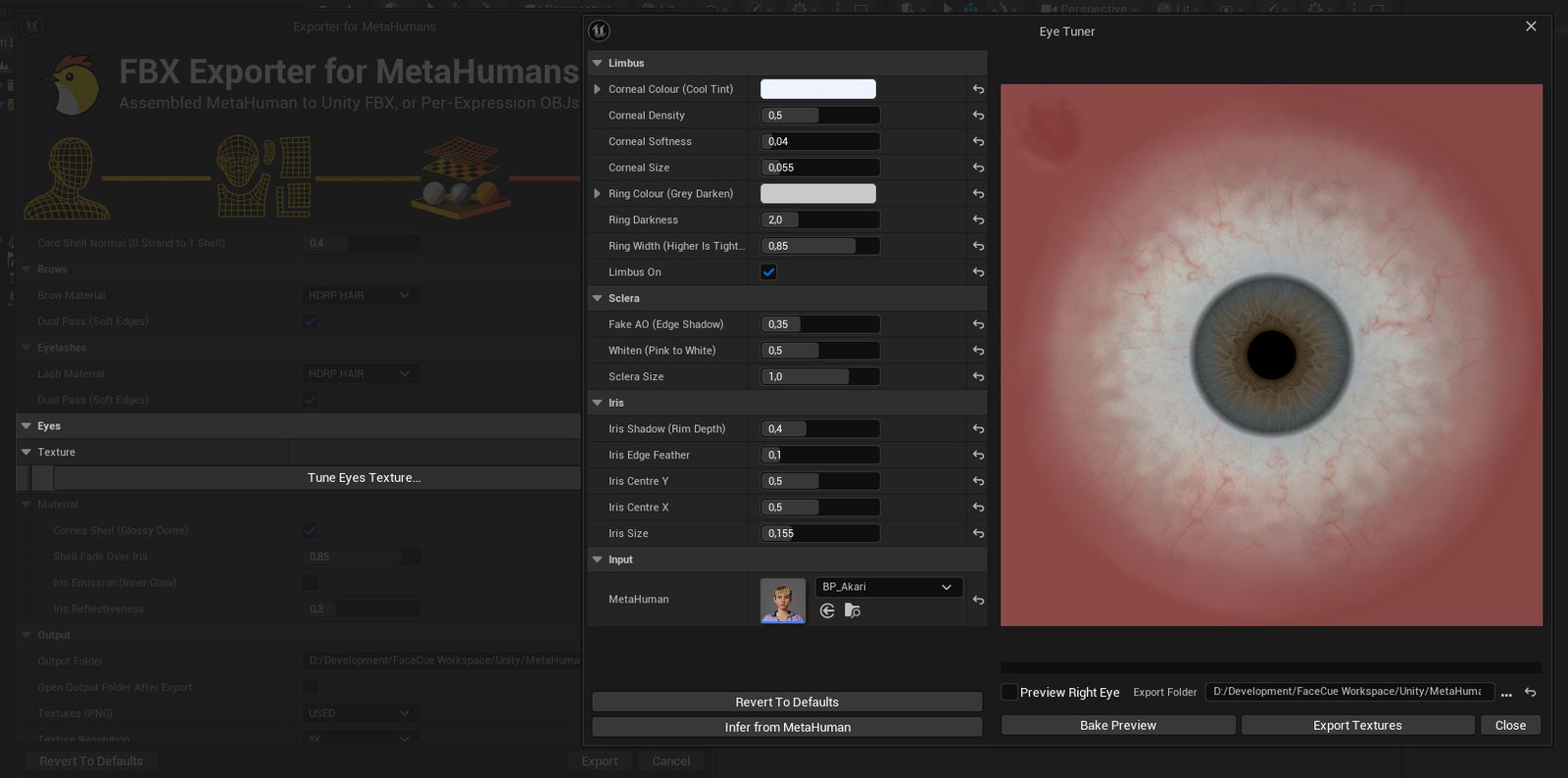
The Tuner's Buttons
- Infer from MetaHuman starts the eye from how the character looks in Unreal: the iris and pupil, the iris edge and the veins in the white from its own eye material, and the iris set richer and more detailed, the way Unreal's eye shading draws it.
- Revert To Defaults puts every look setting back to the plugin's defaults, with the eye as the character's eye material draws it and the iris at the look Unreal gives it.
- Update Export's Eyes rewrites the eyes of the export in the Export Folder with the tuner's look, bound to that export's own eye materials, so you can see a change in Unity without exporting again. Everything else in the folder stays as it is. You do not need it for a normal export.
- Apply keeps the tuner's look for the export and closes it, so the next export uses it.
- Cancel closes the tuner and leaves the export's eye settings as they were. Closing the window does the same.
Eye Material
The material settings sit in groups, from the eyeball outward. Tears and Live Blur start folded, since they are for fine tuning.
Eyeball
- Cornea (Glossy Dome) adds the clear dome over the eye, so it catches a highlight the way a real eye does. Off, the eye reads flatter and drier. In Unreal the eye is one wet surface, and the dome plays that part, over the iris and the white alike. The dome sits on the eyeball itself, so it turns with the eye and the lids close over it without touching its reflection.
- Reflection Sharpness sets how sharp the reflection is, from a softer, broader highlight to a crisp, mirror-like one. It starts at the smoothness Unreal gives a MetaHuman's eye.
-
Iris Glow lights the iris from within, so its colour stays alive in shadow instead of going muddy. Without it the iris is lit by the scene alone, which is truer under studio lighting.
- NONE exports no glow.
- DISABLED brings the glow with the eye material, switched off, so you can turn it on later in Unity without exporting again.
- ENABLED exports the eye glowing.
Unless it is on NONE, Glow Strength (EV) sets how strongly it glows, and Rim Fade how far the glow fades before the dark ring at the edge of the iris.
-
Iris Sheen gives the iris a sheen of its own beneath the dome. The dome already carries the eye's reflection, so this adds a second highlight on the iris, and it is most useful with Cornea off.
Shade & Lid Edge
- Socket Shade shades the eye toward the lids and the inner corner, the soft shadow Unreal lays over a MetaHuman's eye, so the eye sits in its socket instead of looking pasted on. It dims the dome's reflection there too, as Unreal's shade does. It takes the character's own settings from Unreal, and Shade Strength makes it lighter or deeper.
- Caruncle Tone (%) deepens the pink inner corner of the eye beside the nose, which Unreal draws darker than its colour, and lets it meet the white in its own colour instead of a dark rim. It changes the face's colour map, so it takes effect when the textures are exported.
- Soften Lid Edge softens the edge where the lids meet the eye. Underneath, the lid skin ends in a thin dark line against the eye, and Unreal hides it by blurring what lies behind the lids' edge, which a Unity material cannot do. With this on, the lid runs into the eye as it does in Unreal, and it follows the scene's lighting as the lid does. It needs a Full Export: Update Existing on a folder exported before this setting leaves the line as it is.
Tears
- Tear Shine (%) gives the thin film of tears along the lower lid its wet line of light, as Unreal draws it, which also softens where the lid meets the eye. Lower dries the eye, and 0 leaves the tears without shine. It tunes with Update Existing.
- Tear Line Shade (%) lays a faint shadow in the film of tears over the line where the lower lid meets the eye, reaching a little onto both, which softens that line. Shade Onto the Eye (mm) and Shade Onto the Lid (mm) set how far it holds its depth on each side, and Fade Onto the Eye (mm) and Fade Onto the Lid (mm) how gently it fades beyond that. The film ends a fraction of a millimetre onto the lid, so the shadow can reach no further there. It needs Soften Lid Edge on, and it tunes with Update Existing. With the live blur on it is left off, since the blur softens that line itself.
Live Blur
With Socket Shade on, the edge of the eye softens into the lids and the pink inner corner the way Unreal blurs it, drawn live in Unity by a shader that comes with the export, on URP and HDRP alike. On URP it needs Opaque Texture on in the project's URP asset, see The Live Eye Blur. These settings shape the blur, and they tune with Update Existing.
- Blur Amount (%) sets how strongly the edge softens, against the MetaHuman's own blur.
- Blur Reach Top, Bottom, Outer and Inner (%) set how far the blur reaches onto the eye from each side of it. The top stays short, so the eye's reflection under the upper lid stays clear.
- Blur Corner Lift (%) lightens the blur's shade over the pink inner corner, so the corner meets the white without a seam.