The Rows
What each row of the Cue Clip Composer is telling you, and how to read the marks that appear on a cue. This page covers what the window shows you when it opens.
The window stacks the performance as rows, one stage per row, all sharing a timeline. Reading down the stack takes you from the audio at the top to the shapes on the face at the bottom.
Six rows are drawn when it opens, and a seventh is one toggle away. That is the working set, and it is the whole of this page. The Advanced and Expert toggles unfold a great many more, which is covered briefly at the end.
Audio Waveform
The sound itself, drawn across the clip.
It is the row you use to find your place. Everything else lines up against it, so a cue that looks wrong against the waveform usually is wrong, and a silence that has cues in it is worth checking.
Words & Letters
What was said, and how it was broken up.
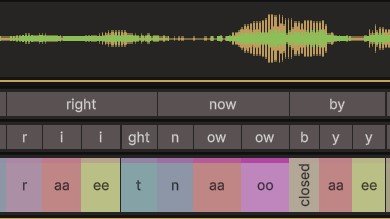
Words merges consecutive cues that belong to the same word into one span, so the row reads like the line of dialogue. Letters splits that down to the piece of spelling each cue came from, so night shows as n, i and ght sitting over the three cues that make it.
Together they answer the first question you have when something sounds wrong, which is whether the recognizer heard the right words at all. If the Words row says something the actor did not say, the problem is upstream of anything you can fix here, and the fix is a transcript. See Recognizers.
Visemes
The cues. This is the row you spend your time in.
Each block is one mouth shape, held for as long as the block is wide. The label is the shape's name, and the colour is that shape's colour, so a repeated phoneme is the same colour every time it comes round.
The row is a score, not the motion. A block says when a phoneme happens. It does not say how long the face spends on it, and the two are not the same thing. Each shape's effect reaches beyond its own block, into the phonemes around it.
So blocks sit side by side because two phonemes cannot happen at once, while the movement they produce overlaps almost all the time.
Gaps are ordinary. A pause has no cue over it, and neither does a stretch the recognizer could not place. What you will not find is two blocks on top of each other.
The Marks on a Cue
A cue carries more than its shape. Three things are drawn on the block itself, in three places that do not collide, so you can read all of them at once.
Stripes along the top and bottom edges are secondary articulation, each mouth shape taking on the qualities of the phonemes around it, or special qualities attributed to linguistic context, usually tuned per language. It is why the same phoneme never looks quite the same from one word to the next. The bottom stripe also has a row of its own further down.
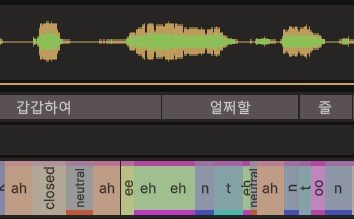
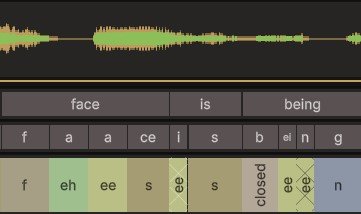
A cross-hatch behind the label is a schwa. The schwa is the weak, neutral vowel of a syllable nobody leans on, and a vowel there relaxes toward it instead of reaching its full shape. FaceCue shapes it that way, and the hatch sits faintly behind the label so it never makes it harder to read.
This Is the Difference Between Speech and Recitation
All three marks are FaceCue doing what a mouth does, not what a spelling says. They are worth knowing about mostly so you recognise them when you see them, and so a cue that looks under-shaped reads as deliberate and not as a bug.
Reading a Cue
The marks tell you at a glance. Hovering a cue tells you in words, which is quicker than opening it when you only want to look. Hold Shift to keep it up while you move around, and let go to retract it.
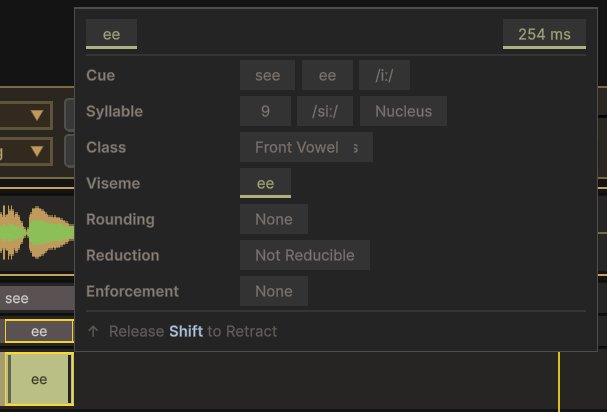
This is where the three marks turn into words. Rounding and Reduction name what the stripe and the hatch are doing, so a shape you were not expecting can be traced back to the reason it is there, and the rest places the cue in its word and its syllable.
Cognitive Events
Moments where something is going on inside the character, marked as points on the timeline with an optional duration. They come from the cognitive tags in the transcript, and you can place them yourself. There are three kinds, Thinking, Agitation and Excitement, and the kind is chosen on the marker.
What a marked moment does today is in the eyes. A Thinking moment makes the character look away for a moment, slows the blinking, the way it does in someone concentrating, and widens the pupils. A moment marked on its own in the transcript, with <Think/>, shows here as its line alone: how long it lasts is the character's to decide. Agitation and Excitement both raise the character's arousal, which quickens the blinking and widens the pupils too. Each eases in and out over the event rather than switching at its edges, and each is tunable on the character's Eyes driver, including down to no response at all. What these moments set is on Mental State.
This row starts hidden. It sits behind Show along with the language spans row, because most clips carry neither and the two would otherwise sit empty above the output. Turn that category on when you are working with a clip that has them.
More Is Planned From These
A marked thinking moment is a general signal about the character's inner state, and the eyes are the first thing reading it. Others will follow. Events you author now carry forward, so a clip marked up today gets the additions when they land. See the roadmap.
Emotion Cues
The authored emotion timeline. Each cue draws as a trapezoid with five handles: where it starts, how fast it comes up, how long it holds, how fast it goes away, and where it ends.

Nothing here is inferred. Emotion is authored, whether it came from a tag in the transcript, from this row, from a Timeline track or from your own code. FaceCue does not guess how a character feels from the sound of their voice.
The row header carries Emotions Timing and Expressions, which switch between the emotion as you authored it and the expressions it resolves into on this character. With both on, the authored shape and the expression shapes are drawn together, dotted and dashed, so you can see one becoming the other.
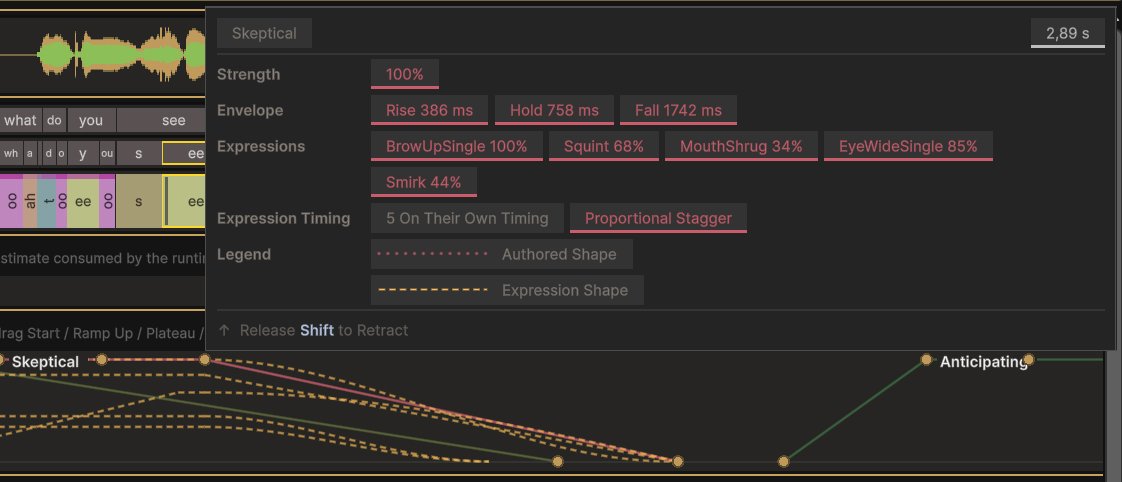
Hovering one shows the whole of it: its strength, how long it takes to rise, hold and fall, and the expressions it becomes with the weight each one carries. Each of those expressions keeps its own timing inside the emotion, which is why an emotion arrives as a face doing several things slightly out of step rather than as a single pose fading up.
This is the layer you would tune if an emotion reads wrongly on your character. The vocabulary of emotion names is fixed, and what each one looks like is yours. See Emotion.
Final Output
How much of each mouth shape lands on the face, drawn as stacked bands from nothing up to full.
This is the end of the chain and the row to read when you want to know what the audience will actually see. Everything above it is how FaceCue arrived here.
Unlike the rows above it, this one is computed instead of read from a file, so it needs a sweep behind it. Auto takes care of that, which is why the row is usually just there.
It is worth comparing against the Visemes row when something looks wrong. If a shape is in the cues but flat in the output, the cue is fine and something further down is holding it back. If it is missing from both, the problem is the bake.
What Advanced & Expert Add
Advanced and Expert unfold the stages in between, which is most of the window. They are worth reaching for when you want to know why a line looks the way it does, and worth folding away the rest of the time, because the overview is the thing you lose.
Those rows are documented where they live, in the window itself. Every row in the window carries a question mark on its right-hand side that explains that row, which is a better place for it than a page you would have to keep in step with the window.
Unfolding a Row Does Not Compute It
Like Final Output, these are drawn from a sweep instead of read from a file, so unfolding them shows nothing until one has run. Auto keeps that up to date as you change things.