Eyes Channel
The look shapes, blinks and pupils, the parts each one is built from, and the lids and brows that follow a look.
The Eyes channel is the one channel whose recipes ship already divided into parts, and those parts are the point of it. An eye never moves on its own. The lids and brows go with it, each in its own way and at its own pace, which is why each is a part of its own. You author what each part looks like on your rig, and the Eyes driver moves each one with where the character is looking.
 1
2
3
4
5
6
7
8
9
10
11
1
2
3
4
5
6
7
8
9
10
11
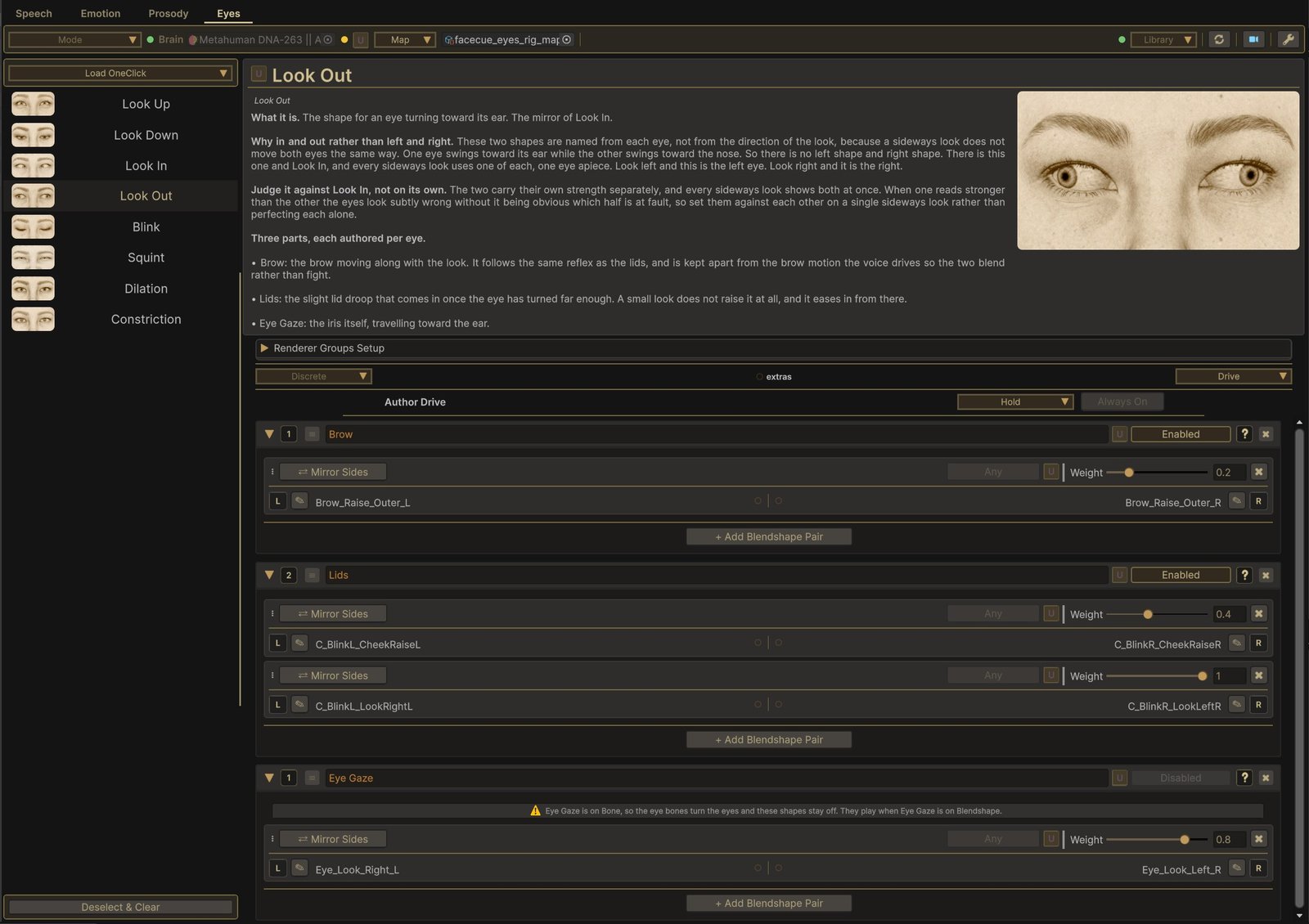
- The recipes. The fixed set, in the order the channel shows them.
- The description. What the recipe is, why it matters, and what each of its parts is for.
- Author Drive. Holds or sweeps the look while you build it. See Previewing a Look.
- Brow. The brow moving with the look.
- Lids. The lids going along with it.
- Eye Gaze. The iris itself. See Eye Gaze.
- Enabled, Disabled. Switches one part off without clearing its blendshapes.
- The help button. What this part is for, on this recipe.
- A per-eye pair. One blendshape for each eye, left and right, since each eye does its own thing on a sideways look.
- A locked Disabled. Eye Gaze is held off while the Eyes driver's Eye Gaze is on Bone, and its toggle cannot be changed until it is on Blendshape.
- The warning. Shows once a held-off Eye Gaze holds blendshapes, as a reminder that they stay off on this character.
The Recipes
The library ships a fixed set, listed in the order the channel shows them.
| Recipe | What it is | Its parts |
|---|---|---|
| Look Up | Both eyes turning upward | Brow, Lids, Eye Gaze |
| Look Down | Both eyes turning downward | Lids, Eye Gaze |
| Look In | An eye turning toward the nose | Brow, Lids, Eye Gaze, per eye |
| Look Out | An eye turning toward its ear | Brow, Lids, Eye Gaze, per eye |
| Blink | The close | Lids, Squint |
| Squint | The eyes narrowing, for focus or strain | Binds only |
| Dilation | The pupils widening | Binds, or parts you add |
| Constriction | The pupils narrowing | Binds, or parts you add |
Every recipe opens with a description of what it is, why it matters and how to build it, the same on every character. On the look recipes and Blink, the parts are fixed. You bind blendshapes into them, but you cannot add or remove one, because the Eyes driver moves each one in its own way.
A rig with no pupil blendshapes leaves Dilation and Constriction empty, and plenty of rigs carry only the widening half. Both are ordinary setups rather than gaps.
The Components
The same three names come back across the look recipes, and each does one job.
Eye Gaze
The iris itself, following the look immediately. Bind the rig's look blendshapes here.
This part only plays when the eyes are turned by blendshapes. When Eye Gaze is on Bone, the eye bones turn the eyes and this part is held off, so an eye is never turned twice. Its Enabled toggle reads Disabled and cannot be changed, and a warning shows inside it when it holds blendshapes, as on the MetaHuman above. The lids and brows below still follow either way. Bones & Blendshapes covers the choice.
One Map for Both Modes
The part stays on the map in both modes, and the blendshapes bound into it are kept. So you can bind the look blendshapes once and use the same map with Eye Gaze on either setting, which suits a rig you may run both ways. Switching loses nothing: the toggle keeps its own setting and returns to it on Blendshape.
Before you rely on that, check what the rig's look blendshapes move. On some rigs they carry the lids along with the iris. On Blendshape those lids then move with the eye, on top of whatever the Lids part does. On Bone they are held off with the rest of the blendshape. Author the Lids part with both in mind.
Lids
The eyelids going along with the look. What they do depends on the direction, which is why the part carries the same name in four recipes and behaves differently in each:
- On Look Up, the upper lids widen.
- On Look Down, the lower lids drop.
- On Look In and Look Out, the lids settle slightly once the eye has turned far enough.
- On Blink, the lids are the close itself. Author it as a full close. One that only mostly shuts reads as a heavy-lidded character rather than as a blink.
Brow
The brow moving along with the look, on Look Up and on the sideways pair. It blends with the brow movement the voice brings, the emphasis raises and dips, rather than fighting it.
Squint, on Blink
The tightening that comes along with a close. Bind eye-squint and cheek-squint blendshapes here where the rig has them. It is a part of its own, so a squint an emotion brings at the same moment blends with it rather than fighting it.
Lids & Brows Follow the Gaze
Look at someone looking up and their upper lids lift with their eyes. Look at them glancing hard to one side and their lids narrow a touch and their brow shifts. None of this is expression. It is how the face is built, and a character whose eyes move inside a still face looks wrong without anyone being able to say why. Blinks & Lids covers what the research measured.
So FaceCue moves the lids and brows with the look itself. You author each part once, at full, and how much of it shows follows where the eyes are pointing. It follows the look in two different ways.
Up & Down: The Lids Trail the Eye
On a vertical look the lids follow the eye a moment behind it, while the brow and the iris keep pace. That lag is why the lids and the iris are separate parts on the vertical recipes. Bound into one blendshape, they would have to arrive together.
Sideways: The Lids Join a Wider Look
A small sideways glance moves only the eyes. Turn further and the lids settle and the brow moves with them, growing with the turn. Each eye does this on its own, and so do its lids and brow, since on a sideways look the two eyes are not doing the same thing.
What Is Yours to Set
What each part looks like is set here, on the map. Whether the following happens at all, and how the blendshapes read on this rig, is set on the Eyes driver, in its Gaze Lids section.
- Enable turns the following on and off. Off leaves just the eyeball moving, with the lids and brows held, which is also the quickest way to tell whether a problem is in those blendshapes.
- In/Out Convention and Up/Down Convention say which way round this rig names its look blendshapes, covered below.
Previewing a Look
The four look recipes carry an Author Drive bar, since a look is judged moving rather than held.
- Hold keeps the look at full strength while the recipe is open, so you can build its parts against the finished pose. The bar reads Always On, since there is nothing to start or stop.
- Animated sweeps it. Stopped, it behaves like Hold. Press Play to run it.
How the sweep moves is set in the Settings menu. Animation Mode is Ping-Pong, easing up to full and back, Repeat, ramping up and snapping back, or Realistic, which shapes the motion to suit each recipe. Animation Duration is the length of one cycle.
Look In & Look Out
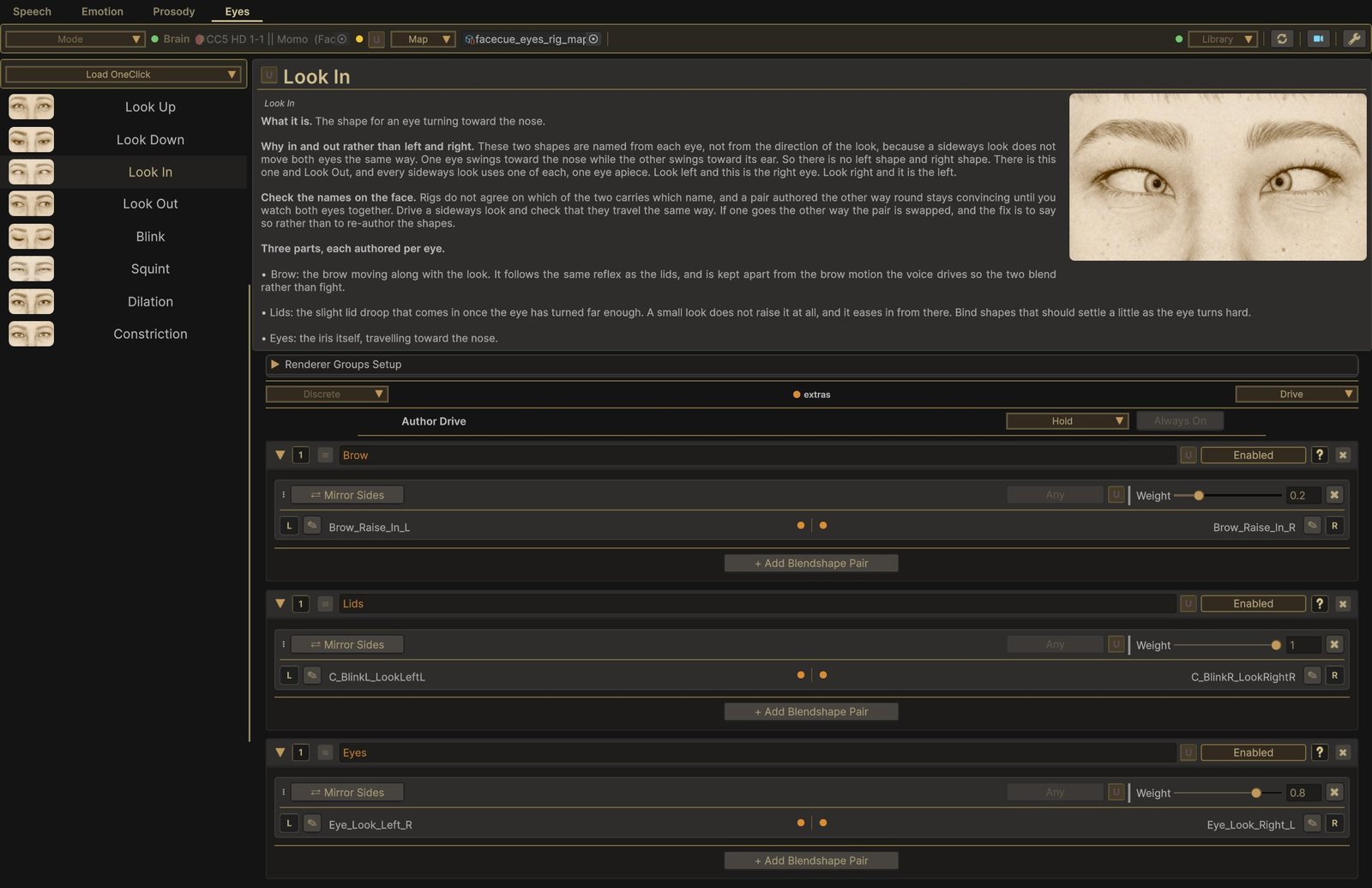
The sideways pair is named from each eye, not from the direction of the look. A sideways look does not move both eyes the same way: one eye swings toward the nose while the other swings toward its ear. So there is no left blendshape and right blendshape. There is Look In and Look Out, and every sideways look uses one of each, one eye apiece. Look left, and Look In is the right eye and Look Out is the left.
Check the pair on the face. Rigs do not agree on which of the two carries which name, and a pair authored the other way round stays convincing until you watch both eyes together. Drive a sideways look and check that the eyes travel the same way. If one goes the other way, the pair is swapped on this rig, and the fix is In/Out Convention on the Eyes driver rather than re-authoring the blendshapes. It is greyed out when Eye Gaze is on Bone, since the bones turn the eyes and the look blendshapes it would flip are held off. Up/Down Convention does the same job for a rig whose up and down read the other way round.
Judge the two against each other. Each carries its own strength, and every sideways look shows both at once. When one reads stronger, the eyes look subtly wrong without it being obvious which half is at fault, so set them side by side on a single sideways look rather than perfecting each alone.