Face Rig Designer
Where a character's maps are opened, read and reshaped.
The OneClick Wizard writes a map for each part of the face from a family template. This is the window those maps are edited in, on your own rig, with the character in front of you while you work.
A map is what turns "this character should be making an sh sound right now" into weights on real blendshapes on real meshes. What sits above it is the same on every character: the cues, the emotions, the gaze. The map is the part that is yours.
The maps FaceCue ships are hand-tuned per family, so what the wizard writes is usually good enough to bake against and nothing here needs touching before your first clip. They get you started.
The designer is where you make a map your own. Part of that is tuning a shape that does not read the way you want it to. The larger part is making the character particular: a mouth that pulls further to one side, a consonant they never quite close, an asymmetry they keep. That is what makes the way a character speaks and emotes theirs rather than the family's, and memorable in your game.
A Map of the Window
 1
2
3
4
5
6
7
8
9
10
11
12
13
14
15
16
1
2
3
4
5
6
7
8
9
10
11
12
13
14
15
16
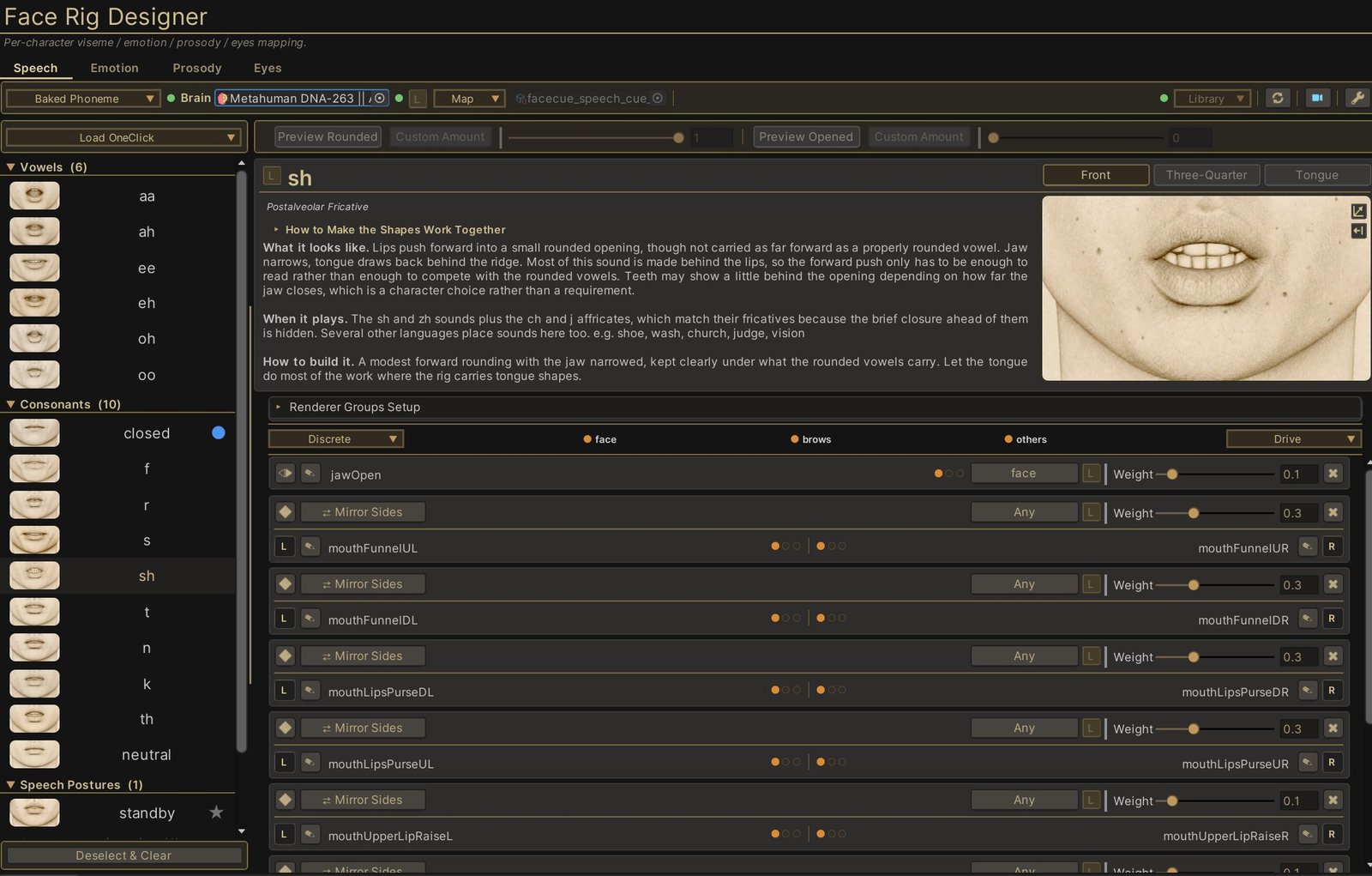
sh viseme selected on a MetaHuman rig. Click the image for it at full size.- The channels. Speech, Emotion, Prosody and Eyes. Each drives its own part of the face through its own map, and the window edits one at a time.
- The channel mode. Which of a channel's ways of reaching the face you are authoring: Baked Phoneme or Live Amplitude on Speech, Layered Emotions or Solid Emotions on Emotion. Prosody and Eyes have one way each, so it sits disabled.
- The brain. The character you are authoring against. Edits drive onto it as you make them, so the Game view answers you directly.
- The state dot. How the map you are looking at stands against the one the character is bound to. Green means in sync, so your edits land on the character's own map. Any other colour means they do not, and hovering says which case. The states are on Concepts.
- Map. Everything you can do to the map itself: make a new one, blank or copied or from a OneClick family, load the character's, point the character at this one, and the JSON round trip.
- The map. The asset being edited, one per channel. Everything below the toolbar is a view of this file.
- The camera button. Puts the character's face in front of you in the Game view, borrowing a camera or lending you a temporary one. Tuning Workflow.
- Load OneClick. Fills this channel from a family template, the same ones the wizard uses.
- A recipe. One thing the channel can make: a viseme here, an expression on Emotion, a look direction on Eyes. The list holds every recipe the library declares, with the selected one open on the right.
- The description. What the shape looks like, when it plays, how to build it. It comes from the library, so it is the same advice on every character.
- The reference. The shape you are aiming at. It shows the core of the shape rather than one particular face, which is what makes it readable as a target. Front, Three-Quarter and Tongue give the angles one view cannot.
- How to Make the Shapes Work Together. Advice about the set rather than the open recipe, folded because it is read once. What carries a performance is the change from one shape to the next, so a set that agrees with itself beats any one recipe being perfect. Each channel has its own.
- Renderer Groups Setup. Which meshes this channel may write to, and how the rig's meshes are sorted into groups. Folded, because most rigs arrive with it filled in. Renderer Groups.
- The renderer groups. The groups this map declares, each with its colour. The dots on the rows below refer to these, and a bind can narrow itself to one of them.
- A bind. One blendshape and the weight it takes when this recipe plays. Binds are what a recipe is made of.
- The region pip. The lettered badge, saying which band of the face this blendshape belongs to: upper, mid or lower. It is how speech and emotion know how to share this blendshape. There is one at every level, map, recipe and bind, each taking the level above until you say otherwise. Concepts.
Three Words for the Rest of the Chapter
The window is one object, read at three depths, and the whole chapter uses these three words.
A map is the file: everything this channel knows about this character. A recipe is one entry in it, one target the channel can ask for, such as the sh viseme above. A bind is one line of a recipe: one blendshape and how much of it that recipe takes.
So a map holds recipes, and a recipe holds binds. There is a fourth level, the component, which groups the binds of a recipe by the part of the face they move. Only the Eyes channel ships components by default, and there they do a specific job rather than being a way of organising your work, so they are covered where they live, in Eyes Channel. On the other channels you can author your own if you want them. Concepts sets all four out properly, along with the library the recipes come from.
Opening It
The FaceCue Hub has a tile for it, and opens it from the menu. Three other routes open it already pointed at something, which is usually what you want:
- The OneClick Wizard's Verify step, under Show In .
- A rig map asset's own inspector, with Open in Face Rig Designer.
- The edit button beside a map slot on any driver's inspector, which opens the window on that driver's channel.
The Window Locks in Play Mode
While the game is playing, the live performance is animating the face, so the controls here are locked rather than fighting it. There is a lock button that unlocks them anyway for the session, and it returns the next time you enter play mode.
The Rest of the Chapter
Concepts is the vocabulary: maps, recipes, components and binds, the library, what having a character bound changes, and what regions are for. It is worth reading once before anything else.
Tuning Workflow is how you actually work: getting the face in front of you, what drives it while you edit, previewing a recipe, and the order of authority that decides who is moving the face at any moment.
Renderer Groups is which meshes a channel writes to, and the one piece of setup a rig can genuinely need.
Then one page per channel. Speech Channel, Emotion Channel, Prosody Channel and Eyes Channel each cover what that channel's recipes are, and what is particular about authoring them.