The Cue Registry
How the runtime finds the bake for a clip. The naming rule, the registry window, and Addressables as the alternative.
Baking writes a cue file. It does not tell the game the file exists. The registry is what closes that gap, and it is the one step between a successful bake and a character that actually speaks.
What the Registry Does
A registry is an asset holding a table: which clip has cues, and where those cues live.
At play time a character does not go looking through your project for a file. It takes the name of the clip that just started and asks the registry for that name. If the registry has it, the cues load. If it does not, the mouth stays still.
That is the whole mechanism, and its simplicity is the point. There is no path to keep in sync, no folder layout to preserve, and moving a cue file inside your project breaks nothing as long as the registry still knows about it.
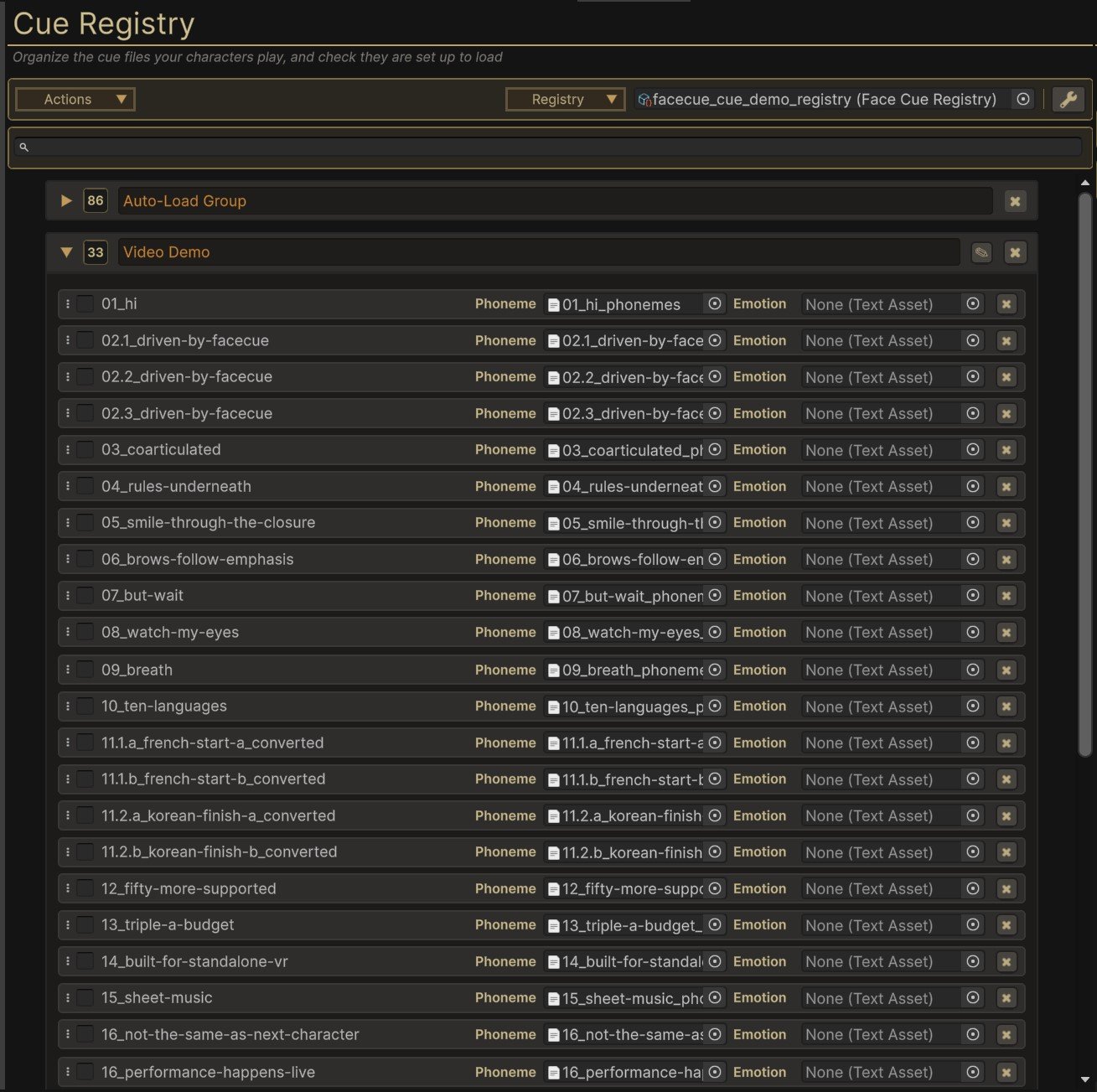
Two Ways to Hold a Clip
A registry sorts its clips into groups, and the group a clip is in decides when its cues reach memory.
Streamable groups are the ordinary case. The registry holds the names and leaves the cue data on disk until something plays, so a project with thousands of baked lines carries a list at runtime and not thousands of cue files. Each streamable group is its own asset, so a group loads as a unit and only when it is wanted.
The Auto-Load Group is the one you opt into. Its clips come in with the registry itself and stay resident, which suits lines that are used constantly and have to be there the instant they are asked for, a character's barks being the clearest case.
FaceCue keeps track of which group holds which clip, so finding one never means opening every group, and it keeps that up to date for you.
Neither One Is Expensive
Cue data is text, and not much of it. A line of dialogue bakes to something in the tens of kilobytes, so a resident group of them is a rounding error next to the audio it goes with, let alone the meshes and textures around it.
Resolving a clip costs nothing either way. The registry reaches its groups directly, with no Addressables machinery in the path, and at most loads the one group that holds it.
The number worth watching is how many clips sit in one Auto-Load Group, since those come in together and stay. Splitting by chapter or content pack keeps that number small on its own, which is the same thing you would do for tidiness.
The Naming Rule
The link between a clip and its cues is the clip's name.
When the baker runs, it writes <clip name>_phonemes.json beside the audio, plus <clip name>_emotions.json if anything in the line put an emotion on the character, such as emotion tags, or a laugh that brings one. When you add that file to a registry, the registry records the name with the suffix stripped. At play time the character looks up the name of the AudioClip that is playing.
So three things have to agree: the audio asset's name, the cue file's base name, and the entry in the registry. The baker gets all three right on its own. What breaks them is renaming afterwards.
Renaming Is the Common Failure
Rename an audio clip after registering it and the registry still holds the old name. Nothing errors at edit time, and the line plays silently wrong the next time you test it.
If you rename, re-add the clip to the registry, or rename the cue files to match and re-add. The registry window's own report will show you which entries no longer resolve.
One Suffix Is Ignored on Purpose
A clip name ending in _el is looked up without it, so barks_01_el finds the cues registered for barks_01. It is a convenience for audio exported from tools that append that suffix.
It also means a clip you genuinely wanted to call something_el will look for something. That is worth knowing before you name a file that way.
Making One
Open the Cue Registry window and use Registry . That puts a registry where the runtime looks for it, and for most projects it is the only one you will ever need. , in the same menu, lets you choose the name and location instead, which is what you want once you are splitting content across several.
Keep both under a Resources folder. That is where every part of a registry works, streamable groups included, and a registry saved there is placed in a FaceCue folder inside it for you.
Adding Clips
Bake, then use Add To from the baker's Results row. That is the short path and it is the one to build a habit around, because it happens while you are already looking at the thing you just made.
Otherwise, open the Cue Registry window and add clips or whole folders to it. A batch adds as a folder, and the window groups the output by clip name for you, so registering 100 lines is the same amount of work as registering one.
If the clips you want are the ones you have just baked, Registry takes the whole output folder in one go, which saves finding it again.
The Actions Menu
Everything the window does to a registry as a whole sits under Actions.
| Action | What it does |
|---|---|
| Create Global Registry | Makes the one most projects need, where the runtime looks for it |
| Create Custom Registry… | Makes one with a name and location you choose |
| Import Last Bake | Takes in the folder the baker last wrote to |
| Validate | Reports entries that no longer resolve, and cue files the registry has lost |
| Remove Orphans | Clears out entries with no cue file assigned at all |
| Rebuild Index | Rebuilds the lookup of which group holds which clip |
Validation is the one to know about. It walks the registry and reports entries that no longer resolve, which is how a rename surfaces at edit time instead of as a silent mouth in a playtest. Auto-Validate keeps it running as you work, so the report stays current without you asking. Remove Orphans clears the entries with no cue file at all, and says how many before it does. An entry whose cue file has gone missing is not one of them. It gets relinked instead, covered next.
Missing Cue Files & Relinking
A registry holds each cue file by Unity's identity for that file, not by its name. When cue files reach a project without their .meta files, copied in from outside Unity for example, Unity gives them new identities, and the registry loses track of them even though they are right there in the project.
The window says so as soon as the registry opens. A banner at the top counts the missing files, and Relink Missing Cue Files finds each one again by its exact name, <clip name>_phonemes or <clip name>_emotions, never by a similar one. A name with a single match is relinked straight away, all in one undo. Where more than one file shares the name, you pick which.
Validate lists the same files one by one, as Cue File Missing, each with a relink of its own. One with no file of that name anywhere in the project is left as a note: bake the clip again, or assign its cue file by hand.
Being Told When a Registry Loads
A registry with problems raises a popup when it opens, listing what it found, with Validate one click away. It speaks up once per registry you open, not again after a script reload. Inform Me On sets what it takes to raise it: Nothing, Warnings, which is the default and includes errors, or Errors. It sits in the window's settings, beside Auto-Validate, and in the popup itself.
Rebuild Index is the rare one. FaceCue keeps the index current by itself, so you would reach for this only if a registry had been changed from outside the window and its index no longer matched its groups.
More Than One Registry
A project can hold as many registries as it likes, and most projects want more than one eventually, usually split by chapter, character or content pack.
Every registry kept under a Resources folder is found, so a character with no registry assigned still finds any clip in any of them. Nothing has to be nominated as the main one. Keep every registry there, ideally in Resources/FaceCue, where puts it.
A Registry Outside Resources
A registry that ends up somewhere else, moved by mistake for example, is still found, but only its Auto-Load Group works. Streamable groups only load from under Resources, which is what lets their cue data stay on disk until a clip needs it, so move the registry back to use them.
A character can also be given a specific registry, which changes what happens when a clip is not in it:
| Scope | If the assigned registry does not have the clip |
|---|---|
| Preferred | Falls back to the project-wide index and looks everywhere else |
| Exclusive | Stops there. The clip does not resolve |
Exclusive is the stricter setting and it exists for content that must not accidentally pick up cues from elsewhere, a downloadable pack being the clearest case.
Registries Have to Be Under Resources
A registry the runtime cannot reach in a build is not part of the index, and FaceCue looks for them the same way in the editor as it does in a player.
That is deliberate. Searching the whole project in the editor would find registries a build cannot, which is exactly the kind of difference that works all through development and fails on the device.
Addressables Instead
If your project already loads content through Addressables, cue files can go that way instead. Add To in the baker becomes available once the package is installed, and the cues load by address when the clip plays.
The address a character looks for is the clip's name with _phonemes or _emotions on the end, such as greeting_phonemes, and that is the address Add To gives each cue. A project that files its addresses under a folder of its own, such as VO/Mara/greeting_phonemes, sets that folder as the prefix, VO/Mara/, in the Speaker Context's Phoneme Cue Prefix and Emotion Cue Prefix, in the Addressables group under Cue Loading. That group shows only while the character's Cue Backend can use Addressables.
It is an alternative to the registry, not an addition to it. Neither is required to use FaceCue, and a project that keeps everything in Resources never needs Addressables at all.
The Registry Is the Faster Route
Use Addressables for cues when your project is already committed to it and you want everything loading the same way. It is the slower of the two, and the gap grows with the number of clips.
The reason is what each one does to find a cue. The registry holds the answer already and then reaches its group directly, with none of the address resolution or bundle bookkeeping that Addressables does per entry. That overhead is small once and noticeable across thousands of entries, and cues come in pairs, so a project with a few thousand baked lines is asking for several thousand addresses.
If you have no particular reason to route cues through Addressables, the registry is the one to pick.
When a Clip Will Not Load
A line plays and the mouth does not move. Work through these in order.
Check the Console first. When no registry or address holds the clip, FaceCue logs Cue Data Not Found the first time it happens on a character, naming the clip and its Look Up Chain, the places it looked, in order. The line then plays another way if it can, and Speech Fallback Engaged says which mode took over and why, while Speech Fallback FAILURE says why none could. Those messages usually end the investigation, and their absence is informative too: if nothing is logged, the clip never reached FaceCue and the problem is upstream.
Then, in order:
- Was it baked? Look for
<clip name>_phonemes.jsonanywhere in the project. The baker writes it beside the audio unless Output Path sent it somewhere else. - Was it added? Open the registry and search for the clip's name.
- Is its cue file missing? A banner at the top of the window says so. See Missing Cue Files & Relinking.
- Do the names match? The audio asset's name and the registry entry have to be identical. This is where a rename shows up.
- Is the registry under
Resources? Outside it, only its Auto-Load Group loads. - Is the character set to Exclusive with a registry that does not hold this clip? Switch to Preferred, or add the clip to that registry.
If all six pass and the mouth still does not move, the problem is no longer the registry. Playing It Back covers what else has to be true for a line to drive a face.